
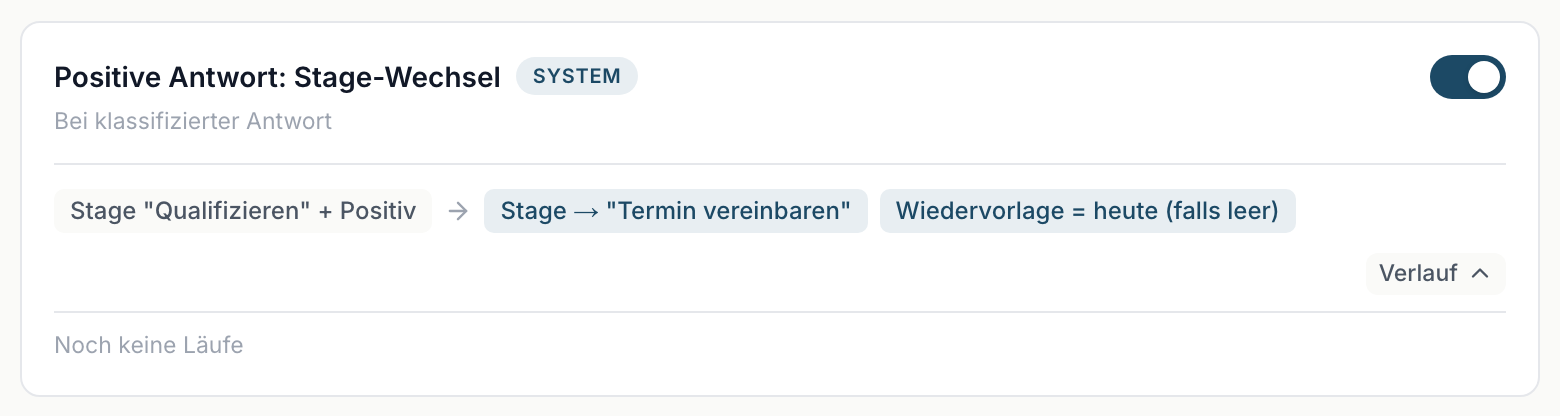
History sits at the bottom right of every card. A click expands that workflow's latest runs. This is where you look when something did not happen the way you expected.
Contents
- What a row shows
- The four statuses
- Reading Branch {n}
- Lead not available
- What the history answers
- When Failed or Partial show up
- Next
What a row shows
One row per run, with four pieces of information:
- The status as a coloured marker.
- The lead's name, linked. A click opens it.
- The date of the run.
- Branch {n}, so which branch fired.
The last five runs per workflow are shown. If there has not been one yet, it reads No runs yet.
The four statuses
| Status | Meaning |
|---|---|
| Success | Every action in the branch went through. |
| Partial | At least one action worked, at least one did not. |
| Failed | No action went through. |
| No match | The workflow was triggered, but no condition applied. |
No match is not an error. It means a reply came in but did not meet this workflow's conditions. On a neutral reply, the workflow for positive replies reports exactly that - quite correctly.
Reading Branch {n}
The number says which branch fired. Branch 1 is the topmost rule row on the card, Branch 2 the second.
That is most useful on Negative reply: mark as lost, the only one with two branches:
- Branch 1 means the lead was on Qualify and was marked as lost.
- Branch 2 means the lead was on a later stage and only a notification went out.
Lead not available
If a name is replaced by Lead not available, the lead was deleted after the run. The history entry stays regardless - the run did happen.
What the history answers
"Why did my lead suddenly jump to Set discovery?" Look at the workflow Positive reply: stage change. If the lead is there with Success, it was the automation and not a colleague.
"Why was a lead marked as lost?" Same route on the workflow Negative reply: mark as lost. The lead itself then shows Lost reason = Negative Reply.
"Why did I not get an email?" Three possibilities, worth checking in this order:
- The workflow is off - you can see that from the switch.
- The run shows No match - the condition did not apply.
- The run shows Success but the mail did not arrive - then it went to somebody else. The recipient is the person the lead is assigned to.
"Is anything running at all?" If all four workflows show No runs yet, no classified reply has come in since setup. Check whether campaigns are running and whether replies are arriving there.
When Failed or Partial show up
Individual failures happen. If the balance was not enough during enrichment, the run sits at Partial: the free company data was added, the chargeable fields were not, and the notification went out anyway. If failures pile up, that is a case for support. Include the workflow's name, the date of the run and the lead's name: Getting help and support.