
A click on a deal opens its detail page. The layout is the same as on a lead, the fields are different.
Contents
- The header
- Pipeline & status
- The other blocks
- Changing fields
- Note, logging and history
- The three fields worth maintaining
- Deleting a deal
- Next
The header
Name, job title and company of the contact, with these to their right:
- Call dials the stored number.
- LinkedIn opens the contact's profile, if a profile address is stored.
- Email opens a new mail window, if an address is stored.
- The menu with the remaining actions.
The arrows page through the list you came from; next to them it reads Deal {n} of {total}.
Pipeline & status
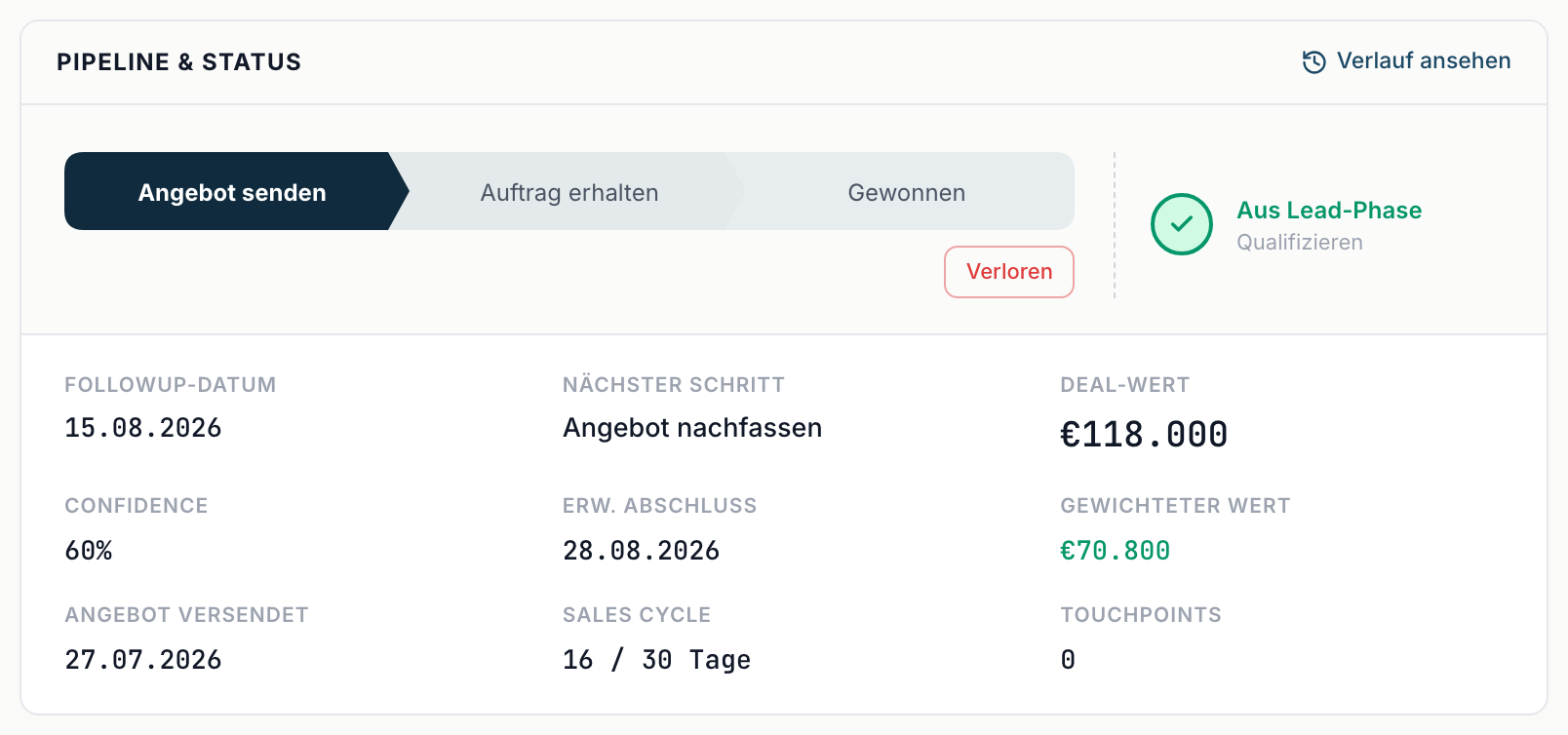
The most important block. The stage bar at the top, next to it the way back via From lead phase. Below:
| Field | Meaning |
|---|---|
| Follow-up date | when you get back to it |
| Next step | what needs doing |
| Deal value | the size of the business |
| Confidence | how likely the close is, in percent |
| Expected close | when you expect to close |
| Weighted value | value times confidence, not editable |
| Offer sent | when the offer went out |
| Sales cycle | how many days the deal has been running, against the stored benchmark |
| Touchpoints | number of contact points |
The other blocks
Contact - Phone, Mobile, Email and LinkedIn.
Company - Company, Employees, Industry, Website and Company LinkedIn.
Details - Campaign, Channel, Lead source and Last reply. If the deal sits on Lost, Lost reason joins them.
System - Last activity, Days in deal, Created and Assigned to.
The fields in Contact and Details belong to the contact person. Change something there and it changes on the matching lead too - it is the same record. The fields under Company belong to the deal's company and apply to all its contacts, see Companies (Accounts).
Changing fields
Click a value. Almost every field is editable in place; hovering shows Click to edit. Changes save immediately and Saved appears briefly.
Note, logging and history
The same tools sit on the left as on a lead: the Note field with Pin, below it the logging area with the tabs Call, LinkedIn, Email and Meeting, and the activity list. The entries Offer sent, Won and Lost appear there too.
View history in the Pipeline & status block shows which fields were changed when.
The three fields worth maintaining
- Follow-up date - without a date the deal appears in no work list. How to set it with the calendar and get an email reminder: Set a follow-up with a reminder.
- Confidence - it determines the Weighted value and therefore the whole forecast.
- Expected close - it decides which monthly bucket the deal lands in.
All three are estimates. An honest estimate beats an empty field.
Deleting a deal
Through the actions menu in the header. The deal lands in the trash and is purged after 30 days; until then it can be restored. With the Sales role you do not see the menu.