
Campaigns ↗ shows where your contacts came from and how well the outreach is going. The page has two sections: Active and Completed.
Contents
- Campaigns are not created in inDeal
- The Active section
- The Completed section
- The header
- What is clickable
- Why your numbers differ from your colleagues'
- Next
Campaigns are not created in inDeal
That is the key point up front: there is no button in inDeal to create, edit or delete a campaign. Campaigns are created in the service your outreach runs through and are then transferred into inDeal.
inDeal displays them, adds the results from your leads, and connects the two. Whoever wants to change a campaign's name, duration or content does so at the source. How the connection is set up is covered in the Integrations and Extension category.
The Active section
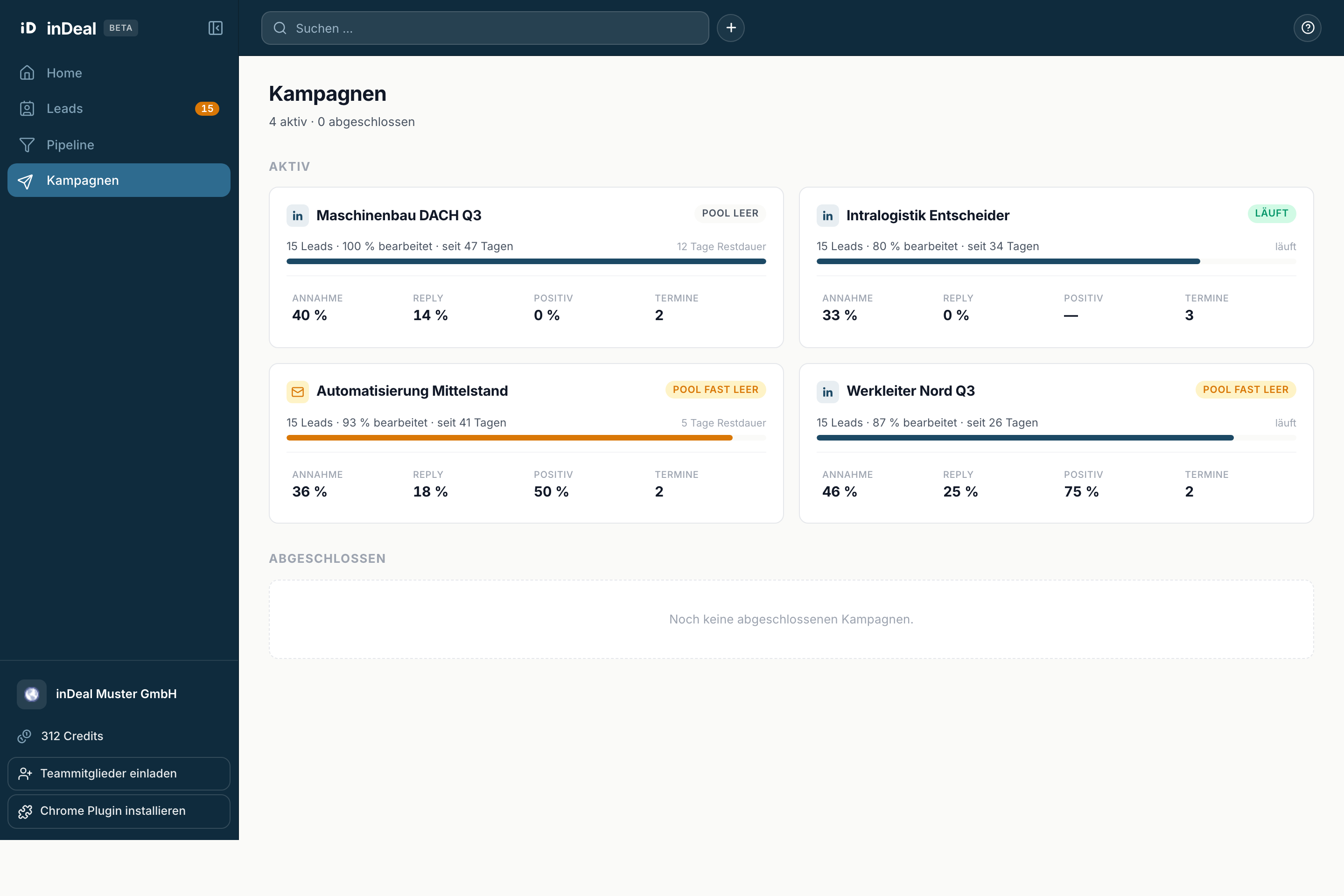
Every running campaign is a card. On it you find:
- An icon for the channel used, next to the campaign name.
- On the right, a marker for the supply of contacts: Running, Pool almost empty or Pool empty.
- The progress line with the count, the share processed and the running time, with a bar below it.
- To its right, the time remaining.
- At the bottom, four values: Acceptance, Reply, Positive and Meetings.
If no campaign is running, it reads No active campaigns.
The Completed section
A table instead of cards, with the columns Campaign, Period, Leads, Acceptance, Reply, Meetings and Status. Every row carries the Completed marker on the right.
If there are none yet, it reads No completed campaigns yet.
The header
Below the title sits {active} active · {done} completed. That tells you at a glance how much is running.
What is clickable
Three places lead onward, each into the lead list filtered to that campaign:
- The progress line opens all leads of the campaign.
- Reply opens the leads that replied.
- Meetings opens the leads with a completed meeting.
Acceptance and Positive are deliberately not linked. Neither value comes from individual leads; they are totals from the connected service - there would be no list behind them to explain them.
Why your numbers differ from your colleagues'
As everywhere in inDeal: with the Sales role you only see figures for your own leads. Two people looking at the same campaign see different values for Leads, Reply, Positive and Meetings.
Acceptance and the progress, on the other hand, come from the connected service and are the same for everyone.