
With webhooks inDeal reports lead and deal changes and new activities to your systems on its own - instead of you polling regularly. Every change arrives as a POST to a URL of your choice.
Contents
- Create a webhook
- Events
- What arrives
- Verify the signature
- Delivery and retries
- If your endpoint was disabled
- Testing and resending
- Rotating the secret
- Zapier, Make and n8n
- Next
Create a webhook
- Open Settings -> API & Webhooks and go to the Webhooks section.
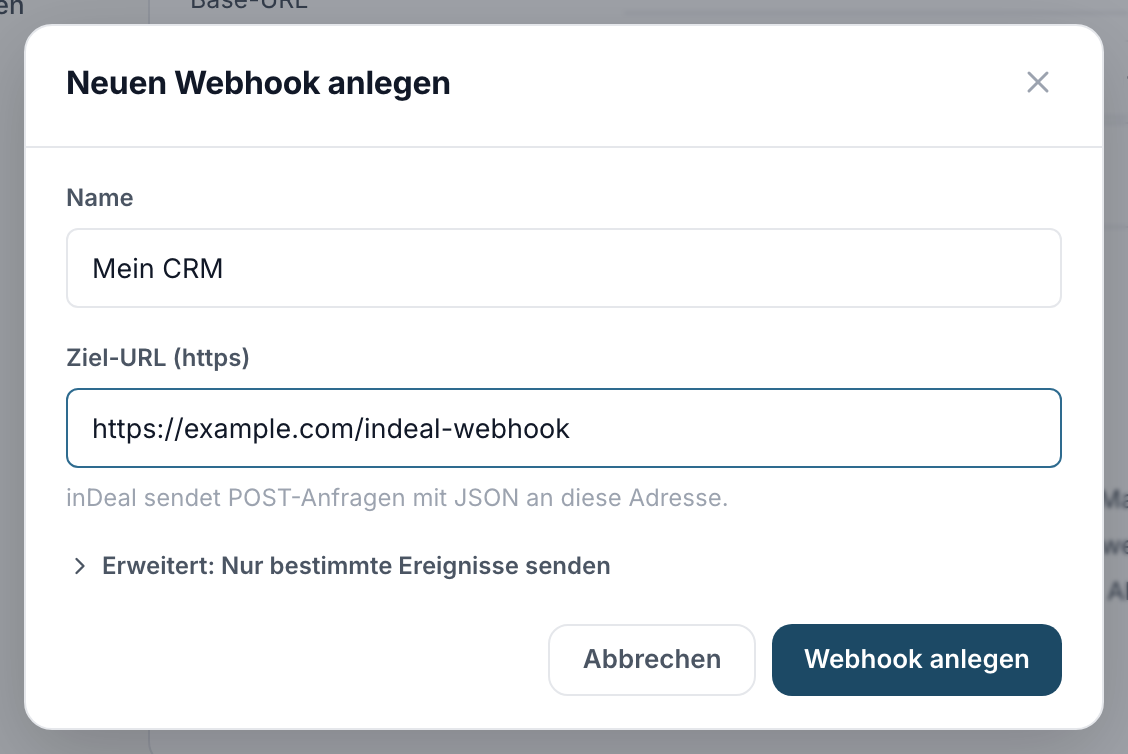
- Click Add webhook. Enter a name and the target URL - it must start with
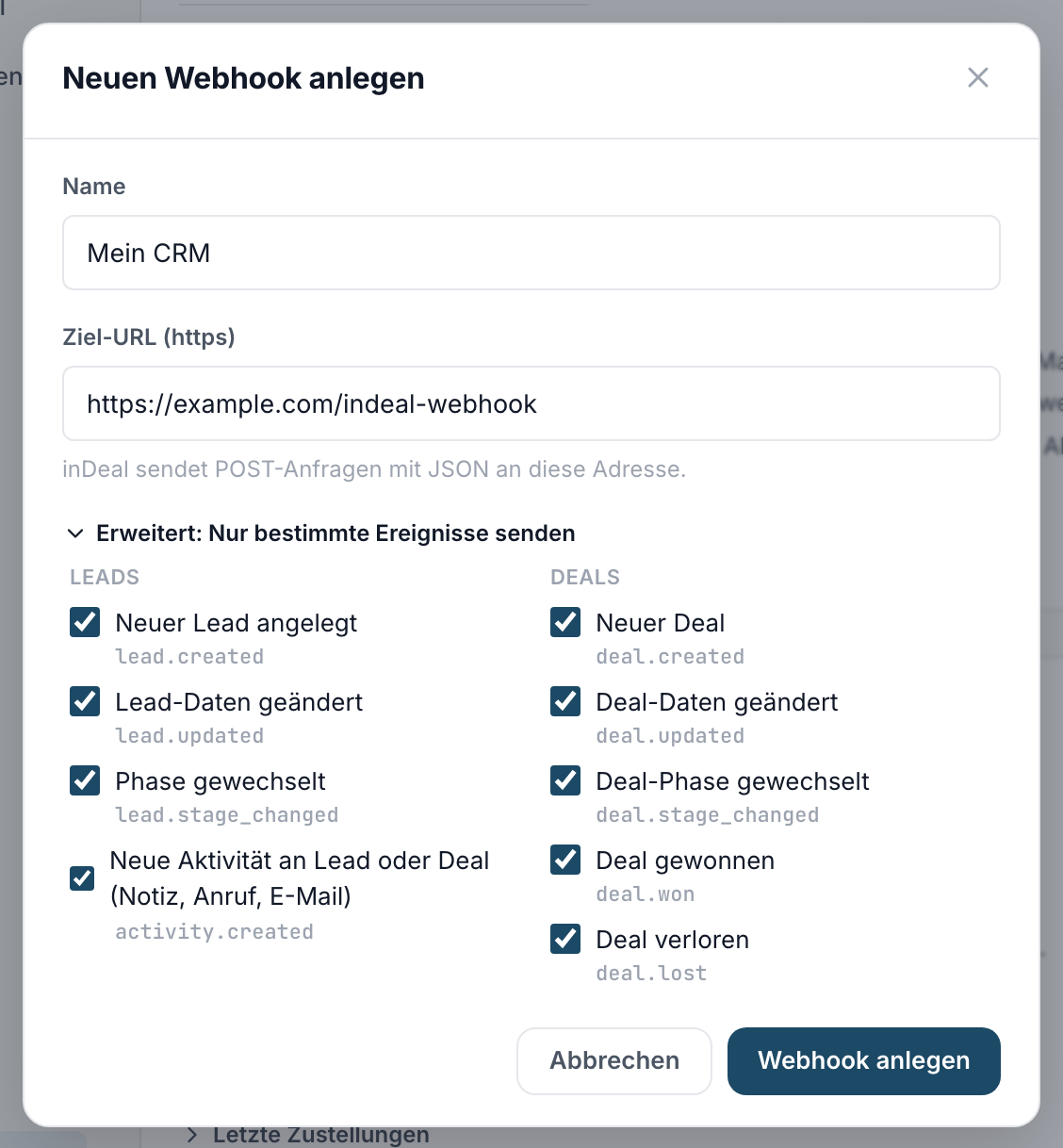
https://and point to a publicly reachable server. Addresses on internal networks,localhost, non-standard ports or redirects are rejected. Your receiver has to accept POST requests there and must not redirect. - All nine events are preselected, four for leads and five for deals. If you only want some of them, open Advanced: send only specific events and untick the others.
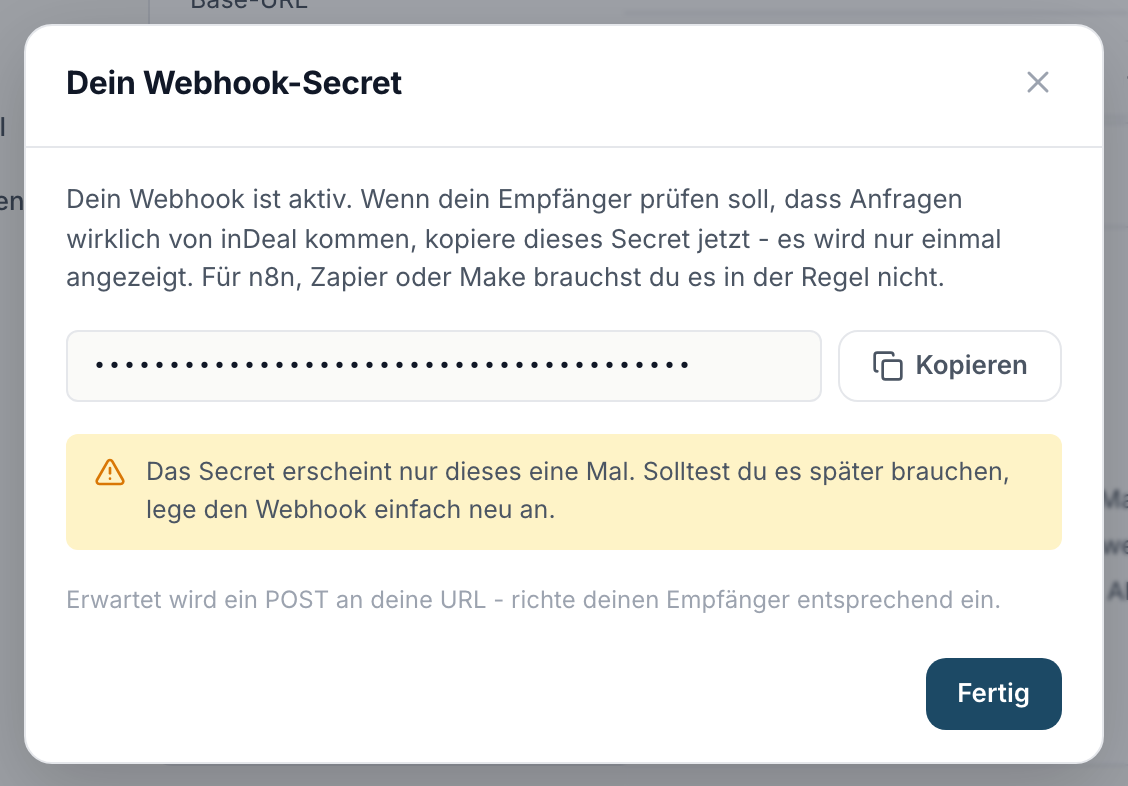
- After creating, your webhook is active and you see your webhook secret. If your receiver should verify that requests really come from inDeal, copy it now - it is shown only once. For n8n, Zapier or Make you usually do not need it. If you need it later after all, generate a new one from the list with Rotate secret, see Rotating the secret.
Up to 5 webhooks are possible - for example one per connected system.
Webhooks you created before the deal events existed do not receive them automatically. The list then shows New: deal events available. - click Edit and tick the events you need.
Events
| Event | When |
|---|---|
lead.created |
A new lead is created, no matter how: manually, via import, via the extension, via the API or from campaigns |
lead.updated |
At least one lead field or a custom field changed |
lead.stage_changed |
The stage changed |
activity.created |
A new entry in the timeline of a lead or a deal: note, call, email, meeting or a reply from a campaign - whether added manually, via import, from the email sync or via the API |
deal.created |
A new deal is created, in the app or via the API |
deal.updated |
At least one deal field changed (value, confidence, closing date, next step, notes) or a custom field |
deal.stage_changed |
The deal stage changed, to whichever stage |
deal.won |
The deal was set to won - comes in addition to deal.stage_changed |
deal.lost |
The deal was set to lost - comes in addition to deal.stage_changed, with the lost reason |
A stage change only produces lead.stage_changed or deal.stage_changed, no additional lead.updated or deal.updated and no activity.created. Closing a deal produces two deliveries: deal.stage_changed plus deal.won or deal.lost. If you only care about the closing, select the last two and leave out deal.stage_changed.
What arrives
Every delivery is a POST with a JSON body:
{
  "event": "lead.updated",
  "occurred_at": "2026-09-03T10:15:00+00:00",
  "lead_id": "0b0e...",
  "workspace_id": "aa70...",
  "data": {
    "id": "0b0e...",
    "full_name": "Julia Weber",
    "stage": "qualifying",
    "company_name": "Muster GmbH",
    "custom_data": {}
  },
  "changes": {
    "company_name": { "from": null, "to": "Muster GmbH" }
  }
}
datacontains the current state of the lead (the same fields as the API response).changesdiffers per event: forlead.updatedit holds only the changed fields with old and new value, forlead.stage_changedit holds{ "stage": { "from": "qualifying", "to": "meeting_scheduled" } }, forlead.createdandactivity.createdit is empty.- Deliveries from the test button additionally carry
"test": true.
For activity.created the object activity comes along - the same fields as when creating an activity via the API. data is the current state of the lead here as well:
{
  "event": "activity.created",
  "occurred_at": "2026-09-03T14:00:00+00:00",
  "lead_id": "0b0e...",
  "workspace_id": "aa70...",
  "activity": {
    "id": "9f3a...",
    "type": "call",
    "title": "Short call, demo next week",
    "body": "Short call, demo next week",
    "quote": null,
    "channel": "call",
    "occurred_at": "2026-09-03T14:00:00+00:00",
    "created_at": "2026-09-03T14:00:01+00:00",
    "pinned": false,
    "edited_at": null
  },
  "data": {
    "id": "0b0e...",
    "full_name": "Julia Weber",
    "stage": "qualifying",
    "company_name": "Muster GmbH",
    "custom_data": {}
  },
  "changes": {}
}
type is one of note, call, email, meeting_scheduled or reply. For reply (a reply from a campaign) the reply text is in quote.
The entity field says what the entry belongs to: lead or deal. For an entry on a deal, deal_id is set, lead_id is empty and data is the current state of the deal.
Deal events look the same, just with deal_id and the deal in data - the same fields as the deal response of the API, including the lead it belongs to. The values of custom fields are in custom_data for leads and deals, the key is the field's API name. When a custom field changes, you get lead.updated or deal.updated. An example of a deal event:
{
  "event": "deal.lost",
  "occurred_at": "2026-09-05T09:30:00+00:00",
  "deal_id": "7c1d...",
  "lead_id": "0b0e...",
  "workspace_id": "aa70...",
  "data": {
    "id": "7c1d...",
    "lead_id": "0b0e...",
    "stage": "lost",
    "value": 12000,
    "confidence": 40,
    "weighted_value": 0,
    "lost_reason": "Budget cut",
    "won_at": null,
    "lost_at": "2026-09-05T09:30:00+00:00",
    "lead": { "id": "0b0e...", "full_name": "Julia Weber", "company_name": "Muster GmbH", "email": "julia.weber@muster.de" }
  },
  "changes": {
    "stage": { "from": "send_offer", "to": "lost" },
    "lost_reason": { "from": null, "to": "Budget cut" }
  }
}
- For
deal.updated,changesholds only the changed fields with old and new value. - For
deal.stage_changedanddeal.wonit holds the stage change, fordeal.lostadditionallylost_reason. - For
deal.created,changesis empty.
These headers come along:
| Header | Content |
|---|---|
X-Indeal-Signature |
sha256=... - the signature, see below |
X-Indeal-Timestamp |
Unix seconds of sending |
X-Indeal-Event |
the event type |
X-Indeal-Delivery |
unique id of the delivery |
Verify the signature
The signature proves the request really comes from inDeal. The text timestamp.body is signed with your secret (HMAC-SHA256). Verify with a constant-time comparison and only accept timestamps at most 5 minutes old.
Node.js:
const { createHmac, timingSafeEqual } = require("node:crypto");

function verify(secret, req, rawBody) {
  const ts = Number(req.headers["x-indeal-timestamp"]);
  if (!Number.isFinite(ts) || Math.abs(Date.now() / 1000 - ts) > 300) return false;
  const expected = "sha256=" + createHmac("sha256", secret).update(`${ts}.${rawBody}`).digest("hex");
  const got = req.headers["x-indeal-signature"] ?? "";
  const a = Buffer.from(expected);
  const b = Buffer.from(got);
  return a.length === b.length && timingSafeEqual(a, b);
}
Python:
import hashlib, hmac, time

def verify(secret: str, timestamp: str, raw_body: bytes, signature: str) -> bool:
    if abs(time.time() - int(timestamp)) > 300:
        return False
    mac = hmac.new(secret.encode(), f"{timestamp}.".encode() + raw_body, hashlib.sha256)
    return hmac.compare_digest("sha256=" + mac.hexdigest(), signature)
Important: verify against the RAW request body, not against re-serialized JSON - otherwise the comparison fails.
Delivery and retries
Respond with a status between 200 and 299. Anything else, including no response within 10 seconds, counts as a failed attempt.
- inDeal tries each delivery up to 8 times, with growing gaps: 1, 2, 4, 8, 16, 32, 64 minutes.
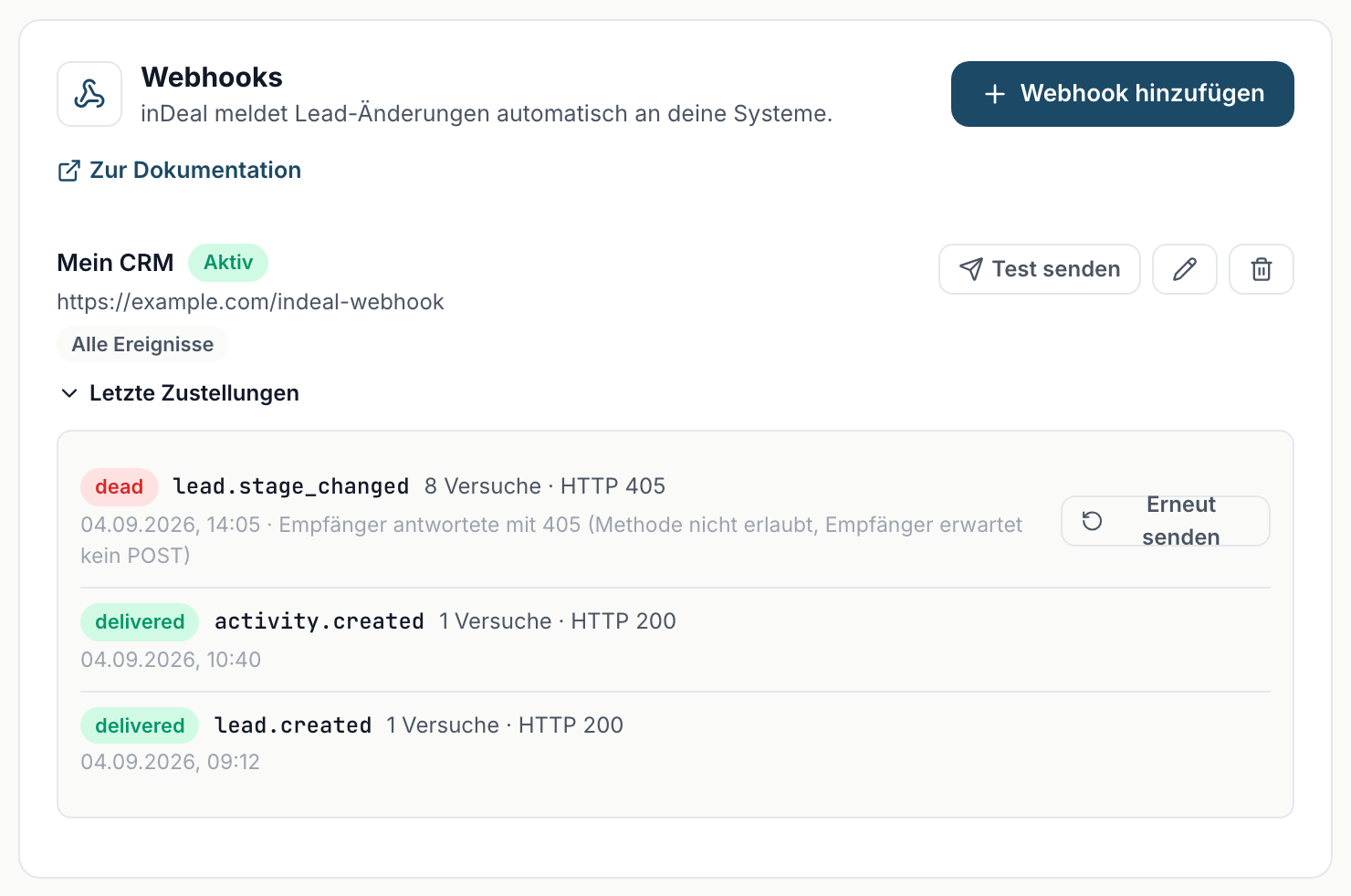
- After the eighth failure the delivery is considered finally failed. You can see it in the Recent deliveries panel and push it again with Resend.
- If 50 deliveries fail in a row, inDeal disables the webhook automatically, see If your endpoint was disabled. From 5 consecutive failures the list already shows a yellow hint.
- Rarely a delivery can arrive twice. Use the
X-Indeal-Deliveryheader to detect duplicates.
If your endpoint was disabled
If 50 deliveries fail in a row, inDeal switches the webhook off. From then on no events are sent to this address, not even new ones.
- You hear about it right away. All admins of the account receive an email with the name, target URL, the last error in plain words and the time. In the webhook list the webhook shows in red as Disabled with the same reason.
- Fix the cause. The most common case: the receiver responds with 404 or 405 because the URL is no longer valid or does not accept POST. With n8n this is typically a test URL with
/webhook-test/in the path. It only works while the workflow is waiting for a test event. For continuous operation you need the production URL of the activated workflow, which contains/webhook/without-test. - Re-enable. Click Re-enable in the list. The failure counter starts at zero and new events are delivered again. Deliveries that finally failed in the meantime can be pushed again with Resend in the Recent deliveries panel.
Testing and resending
- Send test creates a sample delivery of type
lead.createdwith"test": truein the body. It runs through the same path as real deliveries and reaches your receiver within a minute. This lets you check reachability and signature without creating a real lead. Up to 5 tests per minute and webhook are possible, and only while the webhook is active. - The Recent deliveries panel shows status, event, attempts, HTTP code and time per delivery. Resend immediately pushes an undelivered or finally failed delivery again.
Rotating the secret
The secret is shown only once. If you lost it, or want to replace it on a schedule, you do not need to recreate the webhook:
- Click Rotate secret in the webhook row and confirm.
- inDeal shows the new secret exactly once. Copy it and store it with your receiver.
The old secret is invalid from the moment you click. Deliveries sent after that are signed with the new secret - if your receiver still holds the old one, its signature check fails until you replace it there. Name, URL, events and the delivery history stay unchanged. If your receiver does not verify the signature (for example Zapier, Make or n8n without a code step), it will not notice the rotation.
Zapier, Make and n8n
All three tools offer webhook triggers that generate a URL:
- Create a webhook trigger there (Zapier: "Catch Hook", Make and n8n: a webhook node) and copy the generated URL.
- Enter that URL as the target URL in inDeal. Best keep all events selected and filter on the
eventfield in the tool. - Click Send test and build the rest of your flow from the received sample.
Signature verification is optional with these tools - the URLs are long and random, you usually do not need the secret. If you still want to verify, use a code step with the sample above.