
The Pipeline area takes over once a lead has turned into business. It has two views; you switch via the heading at the top left.
Contents
Open deals
Shows the deals still being worked: Send offer and Closing. Closed deals are deliberately absent.
Above the list sits the forecast bar with the Open volume and two monthly buckets. More on that under Forecast, confidence and weighted value.
This is the view for daily work.
All deals
Additionally shows Won and Lost. The forecast bar is gone, because closed deals predict nothing.
This is the view for looking back and searching.
Kanban or list
At the top right you switch between Kanban and List.
Kanban shows one column per stage. Above each column sits the sum, for open stages also the average probability as Ø {value}% confidence, and for Won the note Realized {value}. Above the Lost column it reads last 30 days - only recently lost deals appear there, so the column does not grow over months.
On the cards, next to the name and company, sits the expected closing month as Exp. {month}.
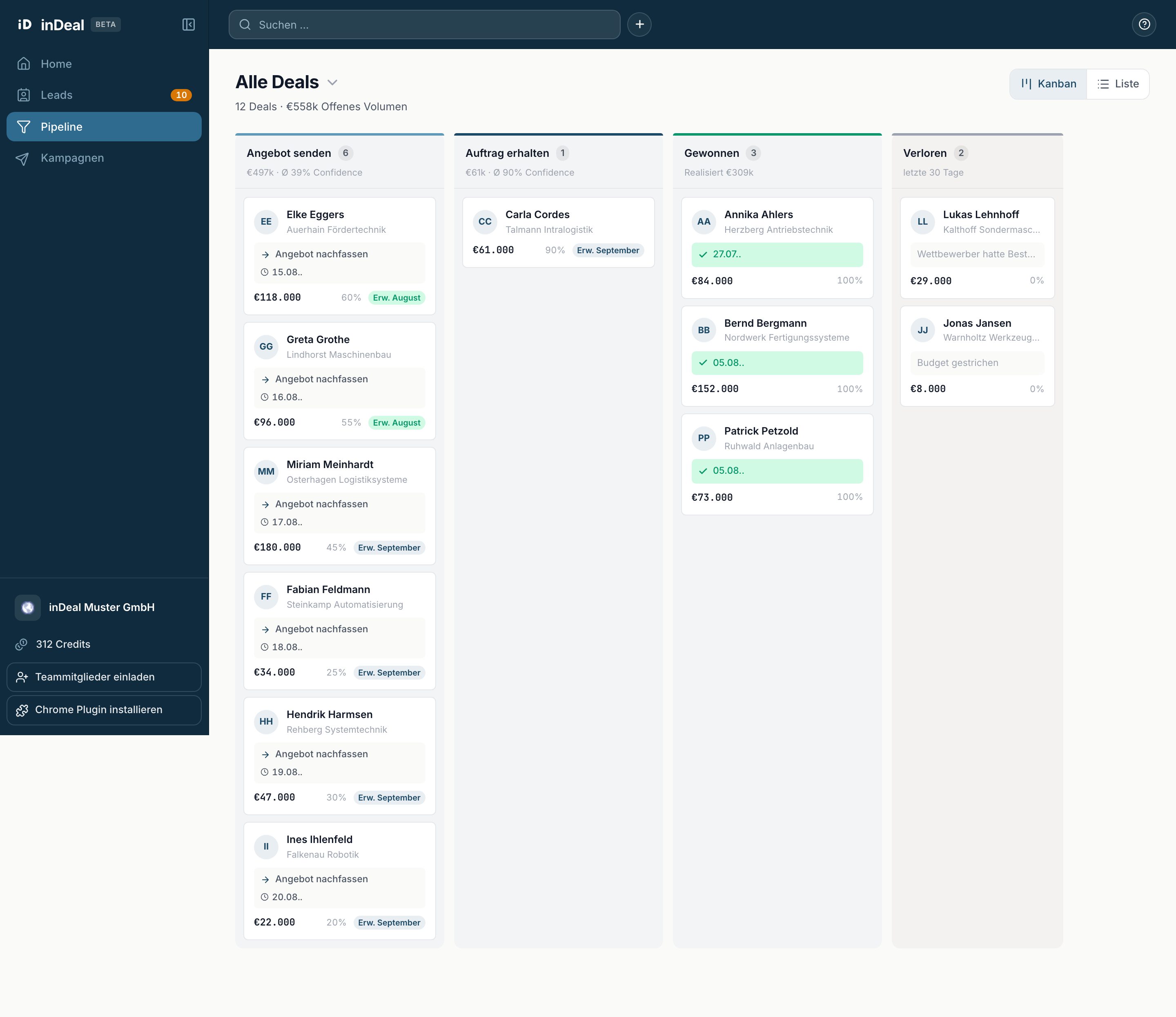
You can drag cards into another column with the mouse. If the target stage needs details, a small window opens.
List shows one row per deal, grouped into Overdue, Due today and Later, with the columns Deal, Stage, Follow-up, Probability, Value and Action.
Searching, filtering, sorting
Above the list you find:
- The search field Name or company ….
- Filter with Stage, Follow-up date (Any, Overdue, Due today, Upcoming, No date), Touchpoints and Value.
- Sorted by with Urgency, Touchpoints, Probability and Value.
The number of results sits on the right. Reset discards the filters.
Why a deal is missing
- You are in Open deals. Won and lost deals live under All deals ↗ only.
- A filter is active. Check the filter bar.
- You have the Sales role. Then you only see deals assigned to you.
- The deal was never created. A lead does not become a deal on its own - that happens via Create offer, see From lead to deal and back.