
Every workflow sits in the list as a card. The layout is the same for all of them, and once you know it you understand every rule at a glance.
Contents
The head
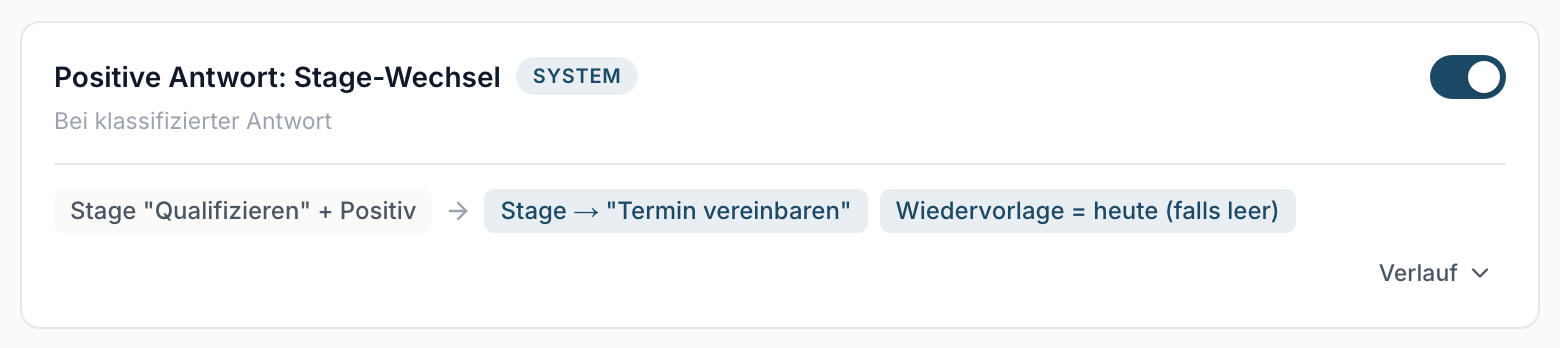
The name on the left, next to it the System marker on the shipped workflows. Below, a short description and the trigger, so On classified reply.
The switch sits on the right. When a workflow is off, the whole card is dimmed.
The rule rows
Below it, one row per branch, in the form
Condition → Action Action
On the left, outlined in grey, the condition. To its right, outlined in blue, one or more actions. The arrow between them simply means "then".
The conditions
| What you see | What it means |
|---|---|
| Positive, Neutral, Negative | the classification of the reply |
| Stage "Qualify" | the lead has to sit on that stage |
| two entries joined by + | both have to apply |
| Always | no condition, the branch always fires |
The actions
| What you see | What it means |
|---|---|
| Stage → "Set discovery" | the lead is moved to that stage |
| Follow-up = today | the follow-up date is set to today |
| Lost reason = Negative Reply | that text is stored as the lost reason |
| (if empty) after an action | an existing value is left alone |
| Enrich data | missing contact details are searched, which costs credits |
| Notification (Positive) | an email goes out, in the version named |
Several rows mean several branches
If a card has two rule rows, the workflow has two branches. They are checked top to bottom, and the first matching branch wins. All others are skipped, even if their condition would also apply.
In practice this concerns the workflow Negative reply: mark as lost, the only one with two rows.
The footer
On the left sits Last changed by {name} on {date}, provided somebody has already used the switch. If nobody has, the spot stays empty.
History sits on the right. A click expands the latest runs, see The workflow history.
When the list is empty
If it reads No workflows yet., none are set up for this account. On a properly provisioned account that should not happen; contact support in that case.