
Two areas in Setup concern the whole company rather than just you: Company ↗ and Performance & conversion ↗. Both are reserved for the Admin role.
Contents
- Company
- Performance & conversion
- The example calculation below
- What these values actually affect
- A good starting point
- Next
Company
Company profile holds three fields:
- Company name
- Website
- LinkedIn profile
The Company name appears at the bottom left of the sidebar and in your legal texts. It cannot be empty; otherwise you see The company name cannot be empty.
Without the permission you get a note saying only customer admins can change the company name; the same applies to the web fields.
Performance & conversion
The section carries the subtitle Default values for forecast and funnel calculations. Adjustable anytime. There are six benchmarks:
| Field | Meaning |
|---|---|
| Lead → meeting booked | Share of leads that lead to a booked meeting. |
| Show rate | Share of booked meetings that actually happen. |
| Pipeline conversion | From completed discovery to sent offer. |
| Deal conversion | From sent offer to won deal. |
| Sales cycle | Average time from offer to close, in days. |
| Customer lifetime value | Average value of a won customer. |
After changing something you save with Save changes; Saved. then appears.
The example calculation below
Below the fields sits the heading What these values do with the note example on 100 leads. It runs your own values through the chain Leads → Meetings → Discoveries → Offers → Customers and ends at Revenue.
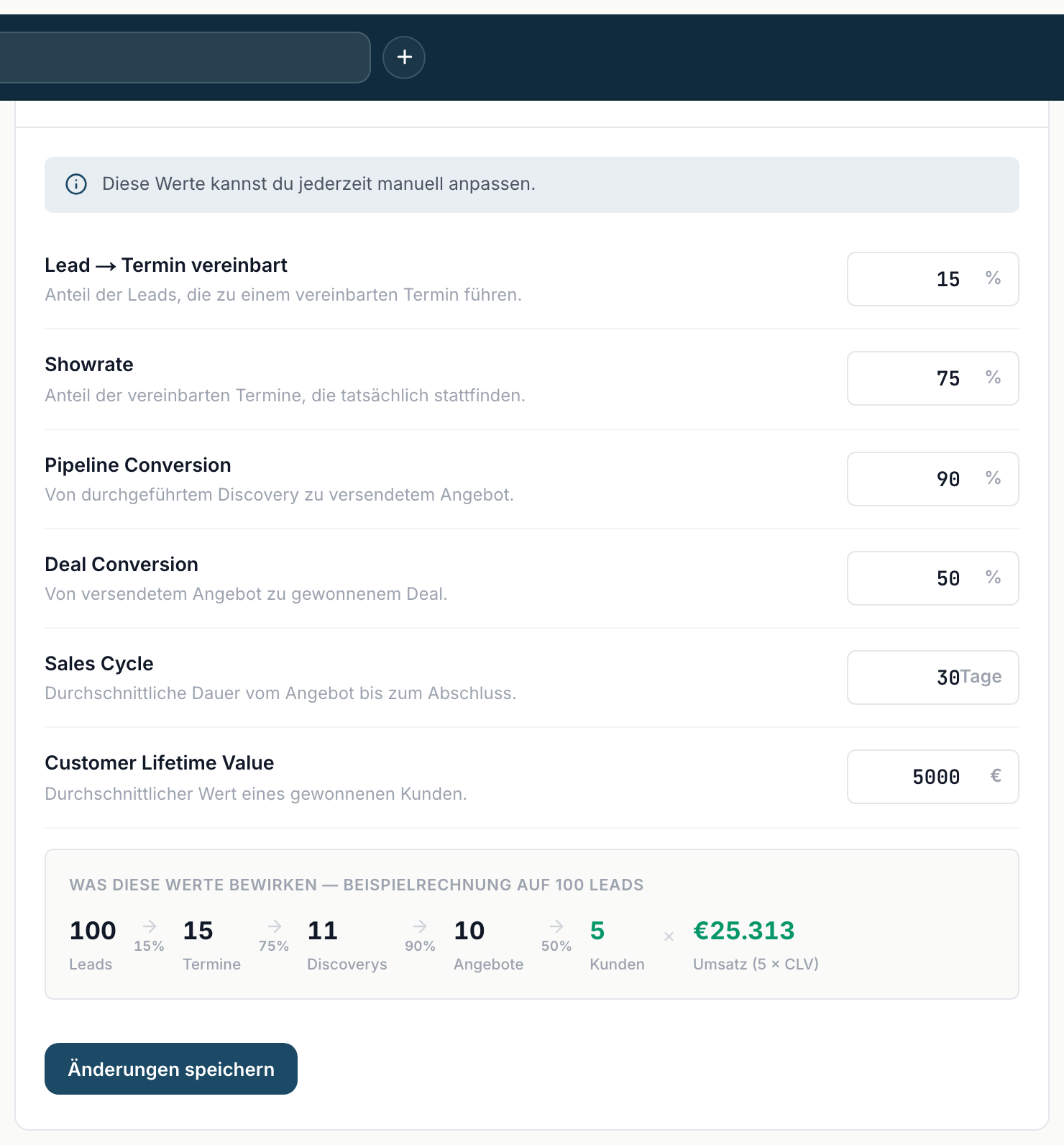
Use it as a sanity check: change a value and see what comes out at the end. If the result looks unrealistic, the benchmarks are too optimistic.
What these values actually affect
Two things, and it matters to keep them apart:
Sales cycle affects the forecast. If a deal has no date under Expected close, inDeal takes the moment it entered the stage and adds this benchmark. If the value is too short, deals appear in the forecast a month too early - and the monthly bucket looks fuller than it is.
The rates do not affect your analyses. The Conversion funnel on Home ↗ works with your real numbers from the past 30 days, not with these benchmarks. A wishful value entered here makes no number there any better.
So the benchmarks are planning inputs, not results.
A good starting point
At the beginning, enter what you estimate from experience. After about three months, compare with the Conversion funnel on Home and adjust. From then on the forecast works with your reality.