
This order has worked well for the first few days. It costs about an hour, spread across the week.
Contents
- Day 1 - check your account
- Day 1 - read Home
- Day 2 - work your first leads
- Day 3 - follow up on meetings
- Day 4 - run your first deal
- Day 5 - back to Home
- Three habits that make the difference
- Next
Day 1 - check your account
- Click your company name at the bottom left and choose Setup ↗.
- Under Personal profile ↗, check that your name is right. It appears on every lead and deal assigned to you.
- Check Language and Time zone. The time zone decides when a date counts as overdue.
Day 1 - read Home
Open Home ↗. Five metrics sit at the top: Leads overdue, Leads due today, Leads today, Pipeline value and Replies. Below them, Weekly trends · Last 4 weeks shows how leads, meetings, deals and revenue have developed.
Further down sits Contact. That is your daily list: overdue leads first, then the ones due today, then the new ones.
Day 2 - work your first leads
- Open Leads and stay in the Open leads ↗ view.
- Open the topmost lead.
- Record what you did and set a next step with a date.
- Move the stage on as soon as it no longer fits: from Qualify through Set discovery to Discovery scheduled.
Work the list from top to bottom. Whatever you leave today is back at the top tomorrow.
Day 3 - follow up on meetings
After a meeting, set the lead to Discovery done. If the meeting fell through, use Discovery failed - that keeps the lead in your work list instead of letting it disappear quietly. If nothing comes of it, set Lead lost with a reason.
Day 4 - run your first deal
Once a lead sits on Discovery done, its detail page shows the Deal phase section with the button Create offer. One click creates the deal and opens it. From then on, Open deal takes you straight back there.
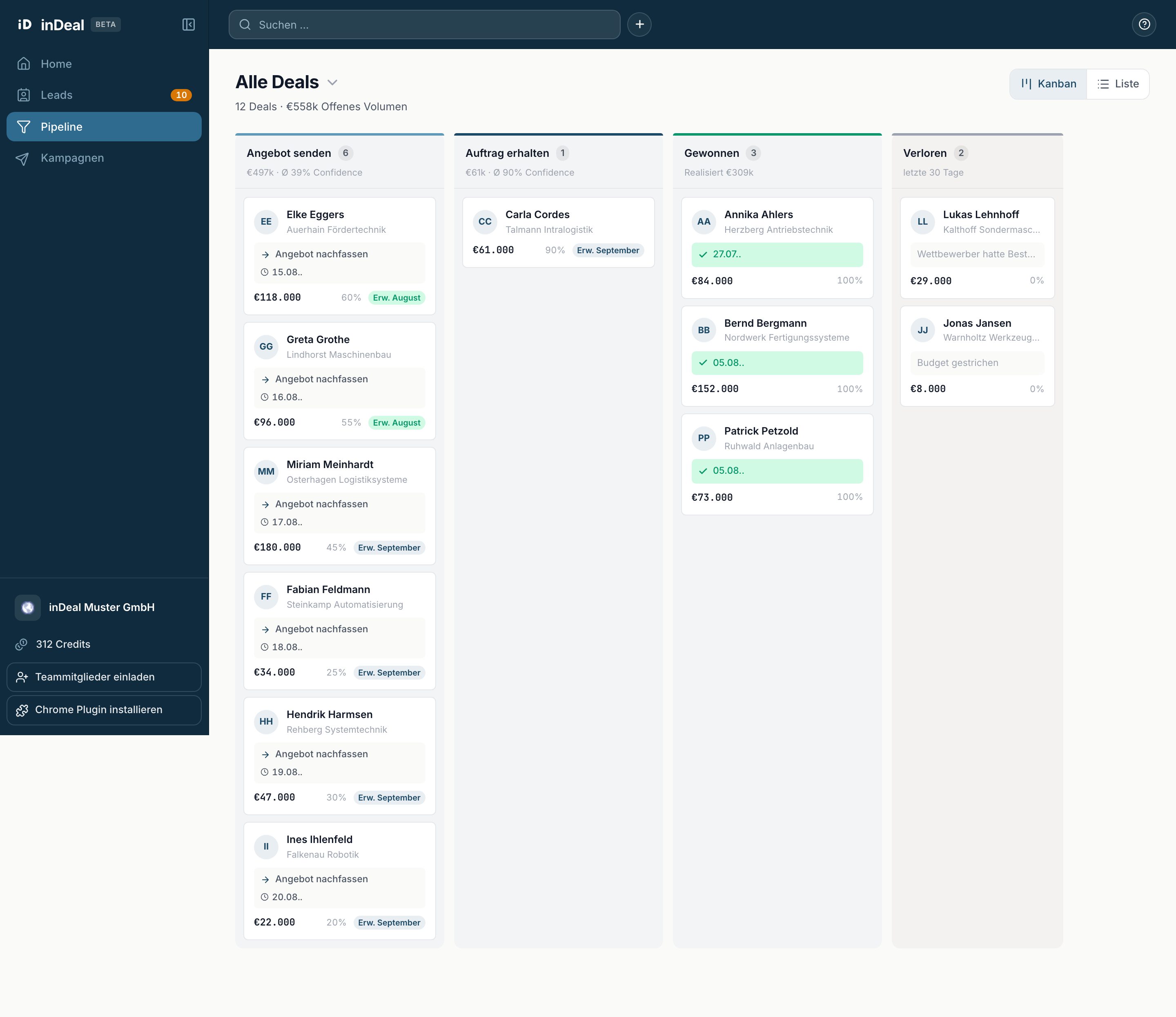
The four columns are Send offer, Closing, Won and Lost. Above the board you see how many deals are open and how much Open volume they hold. Drag a deal into the next column as soon as something has moved.
Day 5 - back to Home
Open Home again and compare with Monday. If Leads overdue has come down and Deals / week shows something, the week worked.
Three habits that make the difference
- Set a next step with a date on every lead you touch. Without a date it never resurfaces on its own.
- Start the day on Home under Contact, not in the full list.
- Move stages on immediately. A wrong stage distorts every number on Home.